
Wi-Fi and networking
Business Wi-Fi and networks, designed and managed
From a single access point to a complete network across several sites, we design, install and manage the wired and wireless infrastructure that your phones, computers and cloud services depend on. We typically deploy TP-Link Omada equipment, managed centrally from a single controller.
✓ Mesh and managed networks ✓ Surveyed before installation ✓ Monitored and supported

Network monitored
Devices and links checked continuously
Voice ready
VLANs and QoS configured for calls
Approaches
Mesh Wi-Fi or a fully managed network
The right design depends on the size of the building, how it is cabled and what runs over the network.
Mesh Wi-Fi
Access points link to each other wirelessly, so coverage can be extended without running new cable to every point. Well suited to smaller offices, older buildings and premises where cabling is impractical.
Managed full network solution
Routers, switches and access points designed, installed and managed by us as one system, with VLANs, guest networks, security policies and monitoring. One point of contact for the whole network.
Wi-Fi site surveys
A survey of your building identifies coverage gaps, interference and the best access point positions, so the design is based on measurements rather than estimates.
Cabling and PoE
Structured cabling and Power over Ethernet switches that power desk phones, access points and cameras from the network, reducing the number of power supplies on site.
| Mesh Wi-Fi | Managed full network | |
|---|---|---|
| Best suited to | Small offices and hard-to-cable buildings | Larger offices, multi-site and voice-critical sites |
| Cabling required | Minimal; one wired point plus power | Cabled access points and switches |
| Capacity | Good for typical office use | Designed for high device counts and heavy traffic |
| Voice traffic | Supported, with QoS configured | Dedicated voice VLAN and QoS end to end |
| Management | Central controller | Central controller, monitoring and change control by us |
| Scalability | Add access points as needed | Add sites, switches and access points to one system |
Equipment
Business-grade hardware
Every component is chosen for the building and the load it will carry, and is configured before it arrives on site.
Wi-Fi access points
Ceiling-mounted Wi-Fi 7 access points such as the TP-Link Omada EAP787, for dense, high-capacity coverage.
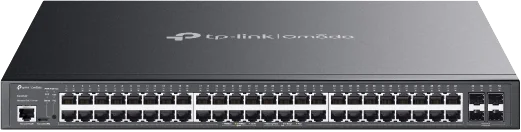
PoE switches
Managed PoE+ switches such as the TP-Link Omada SG3452P, powering phones and access points from the network.
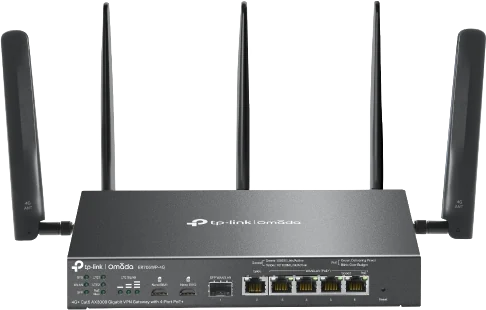
Routers with backup
Routers with built-in 4G backup, such as the TP-Link Omada ER706WP-4G, keep the site online if the main line fails.

Outdoor 5G routers
Weatherproof 5G routers such as the TP-Link Omada ER701-5G-Outdoor, mounted externally where indoor signal is weak.
Process
From survey to support
Survey
Coverage, cabling and existing equipment assessed
Design
Access point positions, VLANs and security defined
Install
Equipment fitted, configured and tested
Manage
Monitoring, updates and changes handled by us
Engineer’s note
Why voice needs a well-designed network
Hosted phone systems are sensitive to delay and packet loss. We place voice traffic on its own VLAN, apply QoS on switches and access points, and check PoE budgets, so calls stay clear when the network is busy.
FAQs
Frequently asked questions
Should we choose mesh or cabled access points?
Mesh is quicker to deploy and suits smaller or hard-to-cable buildings. Cabled access points give the highest capacity and reliability. Many sites use a mix, and the survey tells us which is appropriate.
Can you take over our existing network?
Yes. We audit the current equipment and configuration, document it, and advise on what can be kept, reconfigured or replaced.
Can visitors have separate Wi-Fi?
Yes. A guest network is kept separate from your business network, with its own password or sign-in page and bandwidth limits.
Do you support multiple sites?
Yes. Sites are managed from one controller, with consistent settings and security across every location.
What happens if something fails?
The network is monitored, so we are alerted to failed devices or links. Support is available Monday to Friday, 09:00 to 17:15, with out-of-hours support by arrangement.
Arrange a Wi-Fi survey
Tell us about your building and any problems with the current network, and we will arrange a survey.
Contact
Arrange a Wi-Fi survey
Tell us about your premises, the number of users and any coverage problems. An engineer will reply, usually within one working day.
Unit 5, Acorn Business Park, 5 Northarbour Road, Cosham, Portsmouth PO6 3TH
Monday to Friday, 09:00 to 17:15
Out-of-hours support by arrangement