
Quick reference guide
Yealink T73U user guide
The T73U (also sold as the T73) is a desk phone with a 2.8-inch colour screen and eight line keys, with touch buttons for message, headset and mute. It arrives set up for your system: plug it into a Power over Ethernet network point, or use the Yealink power adapter, and allow a few minutes for it to start.
Keys and lights explained Everyday tasks step by step Printable two-page PDF
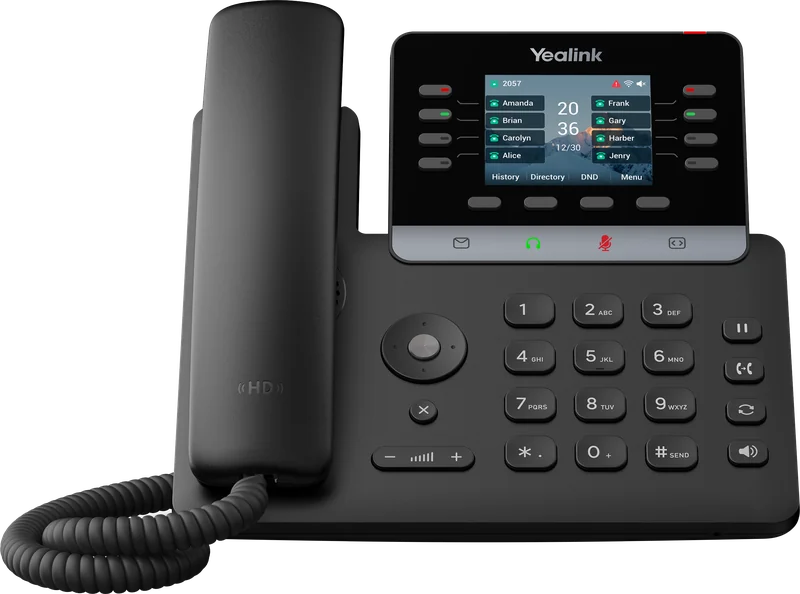
Getting to know your phone
Keys and controls
| Key | What it does |
|---|---|
| Screen | Shows calls, menus and the labels for the soft keys below it. |
| Line keys | Eight keys for your lines, colleagues and shortcuts, with more on further pages. |
| Power light | Flashes when the phone rings or a voicemail is waiting. |
| Touch buttons | MESSAGE opens voicemail, HEADSET switches to a headset, MUTE turns your microphone off and on, and the page button shows more line keys. |
| Call keys | HOLD holds or resumes a call. TRANSFER starts a transfer. REDIAL shows numbers you have dialled. |
| Speakerphone and volume | Hands-free calls, and the volume of the call or ringer. |
| Navigation, OK and Cancel | Move through lists and menus. OK confirms. X cancels or rejects a call. |
| Soft keys | Their job changes with what is on screen, for example Send, Hold or Transfer. |
| Keypad | Enter numbers, letters and symbols. |
Everyday tasks
How to use your Yealink T73U
Soft key labels and line keys are set up for your business, so yours may differ slightly. Call us if something is not where you expect.
Make a call
- Lift the handset, or press Speakerphone or HEADSET.
- Dial the number.
- Press Send, or wait a few seconds for the call to connect.
Answer a call
Lift the handset, press Speakerphone or HEADSET, or press Answer. If you are already on a call, press Answer and your first call is put on hold.
Hold and resume
Press HOLD to put a caller on hold. Press HOLD again, or press Resume, to return to them.
Mute
Press MUTE. The key lights while your microphone is off. Press it again to unmute.
Transfer without speaking first
- During the call, press TRANSFER.
- Dial the number or extension.
- Press TRANSFER again, or press B Transfer. The call goes straight through.
Transfer after speaking first
- During the call, press TRANSFER; the caller is held.
- Dial the number and press Send.
- When your colleague answers, introduce the call, then press TRANSFER. To go back to the caller instead, press Cancel.
Three-way conference
- During a call, press Conference; the first caller is held.
- Dial the second person and press Send.
- When they answer, press Conference again to join everyone. Hanging up ends the call for all three.
Redial
Press REDIAL to see the numbers you have dialled and choose one, or press REDIAL twice to call the most recent number.
Call history and directory
Press History for missed, received and dialled calls, or Directory for your contacts. Highlight an entry and press Send.
Do not disturb
Press the DND soft key while the phone is idle, or go to Menu, then Features, then DND. Callers go to voicemail and a DND icon shows. Turn it off the same way.
Forward your calls
- Press Menu and go to Features, then Call Forward.
- Choose Always, Busy or No Answer and turn it on.
- Enter the number to forward to and press Save. Turn it off the same way to stop forwarding.
Voicemail
Press the MESSAGE key (you can also dial *86 on Gamma Horizon or *2 on Yeastar). The power light flashes slowly when you have a new message.
Status lights
Power light
| Light | Meaning |
|---|---|
| Solid red | Starting up |
| Fast flashing red | Incoming call |
| Slow flashing red | Voicemail or message waiting |
| Brief flash every few seconds | Power-saving mode |
Status lights
Line key lights
| Light | Meaning |
|---|---|
| Solid green | Call in progress |
| Fast flashing green | Incoming call |
| Slow flashing green | Call on hold |
| Off | Line not in use |
Feature codes
Codes for your phone system
Dial these from the keypad. Not sure which system you have? Call us on 0333 358 3000.
Gamma Horizon
Gamma Horizon
| Code | What it does |
|---|---|
| *86 | Listen to your voicemail |
| *62 | Voicemail portal |
| *78 / *79 | Do not disturb on / off |
| *72 / *73 | Forward all calls on / off |
| *21 / #21 | Forward all calls to voicemail on / off |
| *98 | Pick up a call ringing in your group |
| *97 + ext | Pick up a call ringing on a colleague's phone |
| *68 / *88 | Park a call / retrieve a parked call |
| *67 + number | Withhold your number for one call |
| *66 | Redial the last number |
Yeastar P-Series
Yeastar P-Series
| Code | What it does |
|---|---|
| *2 | Listen to your voicemail |
| *12 + ext | Leave a voicemail for a colleague |
| *3 + ext | Attended transfer during a call |
| *03 + ext | Blind transfer during a call |
| *31 + number / *031 | Forward all calls on / off |
| *93 / *91 | Do not disturb / available |
| *4 | Pick up a call ringing in your group |
| *04 + ext | Pick up a call ringing on a colleague's phone |
| *5 / 6xxx | Park a call / retrieve it from slot 6xxx |
| *1 | Start or pause call recording, if enabled |
Standard Yeastar codes. If your system has been customised, yours may differ.
Need help with your Yealink T73U?
Our engineers can talk you through any feature, Monday to Friday, 09:00 to 17:15. Out-of-hours support is available by arrangement.